
Utilizing AI for Content Creation
Artificial intelligence (AI) has become an incredibly powerful resource for content creators. Its capabilities allow for faster idea generation, editing, and even drafting complex narratives.
Pricing Model
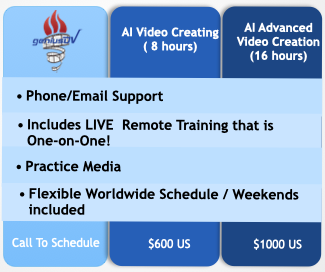
Here is our pricing model: We recommend 2-3 hour sessions to complete the minimum number of hours of training. Course schedule is flexible (weekends, and evenings are available).

Using AI for Video Content Creation
For this course, you will need to pick an AI generative platform. There are hundreds of services to choose from. Many services offer free services, or trials. If you an enrolled student at an accredited college, there are additional discounts for many AI platforms.
- MidJourney – popular AI image generator that creates unique visuals from text descriptions
- OpenAI Sora: Known for cinematic quality video generation.
- Google Veo: Excels at realism, storytelling, and dynamic motion.
- Kling AI: Offers realistic lip-sync capabilities, is cost-effective, and provides good control over generated content.
- Runway: Features advanced editing capabilities and supports professional workflows.
- Luma: Strong performance in text-to-video generation.
- Hailuo / Minimax: Specializes in animation and maintaining consistency in generated content.
- HeyGen: Offers AI avatars, talking heads, and translation features.
- Adobe Firefly: Provides high end video generative content for longer videos with advanced settings.
- Grok: Focuses on fast generative video creation with a basic interface.
Ensuring Continuity in Storytelling
While AI can significantly streamline the content creation process, it currently has some limitations when it comes to producing longer stories. Maintaining continuity throughout a long story is essential to keep readers engaged and ensure the narrative remains coherent.
While AI can help with certain aspects of writing, using specialized software can further support writers by keeping track of details and preventing inconsistencies. By combining AI with other professional software , you can achieve efficiency and quality in your storytelling.
Supplementing AI with Video Editing / Image Editing Software
When aiming to craft extended works, You will need additional software products to assist with organizing chapters, tracking character development, and managing plotlines over time. We will work you through the process on which products will work best for you.
• Avid Media Composer
• DaVinci Resolve Studio
• Telestream Screenflow
• Final Cut Pro
• Adobe Creative Cloud (i.e, Photoshop, After Effects. Illustrator)
We teach all these software products, so pick a video editing platform from above that fits your budget. They all have free trials!
Other Affordable Video Editing / Photo Imaging Software Alternatives
• DaVinci Resolve (Free Option)
• I-Movie
• Clip Champ (free from Microsoft Windows)
• CapCut
• Gimp (Free Photo Editing Software)